
100% bars and GLITS, 20″
The UK DPP line-up: EBU 100/0/100/0 bars filling the 16:9 frame with GLITS tone at −18 dBFS. Runs 09:59:30:00 to 09:59:50:00.

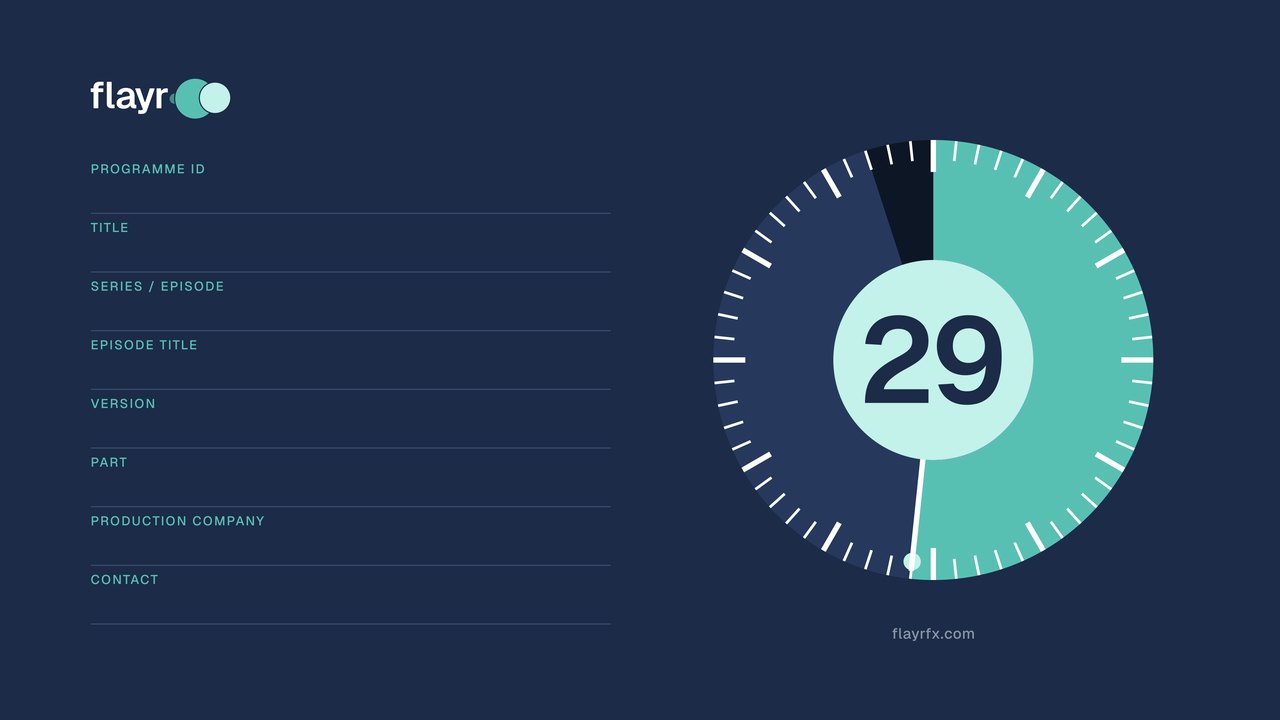
Countdown clocks built to the UK DPP delivery layout, from 10 to 60 seconds, in UHD, HD and 720p at 25 and 29.97 fps. Add colour bars and line-up tone and the After Effects project behind them, and you have the whole head of a broadcast master.
Each clock ends with 3 seconds of black, so its last frame is one frame before the programme starts. The slate lines are left blank for your details: add them with the form below, or in the After Effects project. ProRes 422 HQ MOV masters for broadcast delivery are here in HD at 25 fps; every size and rate comes as an H.264 MP4 for checking and offline edits. For a ProRes master at UHD, 720p or 29.97 fps, render it from the After Effects project in a few minutes.
| Length | UHD 3840 × 2160 | HD 1920 × 1080 | 720p 1280 × 720 |
|---|---|---|---|
| 10″7″ of countdown, then 3″ of black: the UK DPP layout, and Clearcast’s 7″ clock for commercials. | |||
| 15″12″ of countdown and 3″ of black, for a longer read of the slate. | |||
| 20″17″ of countdown and 3″ of black, for broadcasters that ask for a clock of 20″ or more. | |||
| 30″27″ of countdown and 3″ of black: the legacy 30″ ident clock some broadcasters still take. | |||
| 60″57″ of countdown and 3″ of black, for long lead-ins, events and playout. |
| Length | UHD 3840 × 2160 | HD 1920 × 1080 | 720p 1280 × 720 |
|---|---|---|---|
| 10″7″ of countdown, then 3″ of black: the UK DPP layout, and Clearcast’s 7″ clock for commercials. | |||
| 15″12″ of countdown and 3″ of black, for a longer read of the slate. | |||
| 20″17″ of countdown and 3″ of black, for broadcasters that ask for a clock of 20″ or more. | |||
| 30″27″ of countdown and 3″ of black: the legacy 30″ ident clock some broadcasters still take. | |||
| 60″57″ of countdown and 3″ of black, for long lead-ins, events and playout. |
Type the slate details and download them as a transparent PNG that lines up exactly with the blank lines on the clock. Lay it on the track above the clock for its full length. Nothing leaves your browser.

Long entries shrink to fit the line, just as they do in the After Effects project.
Line-up signals timed to sit straight before the clock, as ProRes in HD and MP4 at every size. Tone is a 1 kHz sine whose level is exact to a hundredth of a decibel; bars are built to the exact Rec.709 values (100% white at 940, black at 64 in 10-bit).
The UK DPP line-up: EBU 100/0/100/0 bars filling the 16:9 frame with GLITS tone at −18 dBFS. Runs 09:59:30:00 to 09:59:50:00.
The same signals for a minute, from 09:58:50:00, for broadcasters and facilities that want a longer line-up.
EBU 100% bars with EBU Tech 3304 stereo tone (left channel interrupted every 3″) at −18 dBFS.

EBU 100/0/75/0 bars with GLITS at −18 dBFS: the classic line-up for checking monitors and older specifications.

SMPTE RP 219 HD bars with 1 kHz at −20 dBFS (SMPTE RP 155) for US and NTSC deliveries. Ends at 00:59:50:00.

Black and silence from 09:59:57:00 with the DPP sync plop: two frames of white at 09:59:57:06 and one frame of 1 kHz tone.
The tones as 48 kHz 24-bit WAV files, a minute each (GLITS, EBU stereo, 1 kHz at −18 dBFS and at −20 dBFS), the one-frame sync plop, and EBU 100% and 75% bars as PNG stills at UHD, HD and 720p, to build your own line-up in any edit.
The UK DPP layout for a programme at 25 fps. At 29.97 fps the same layout usually runs to a programme start of 01:00:00:00.
Built to the UK DPP AS-11 delivery specification and common international practice. Every broadcaster publishes its own requirements, so check the current specification for your channel before you deliver.
We measured the files you download, not the design. Every frame of every HD 25 fps ProRes clock and line-up file went through ffprobe and ffmpeg: luma and chroma levels frame by frame, audio level and timing, timecode, metadata, and a frame-by-frame test that the picture changes only on the second. The MP4s and other sizes are made from the same After Effects masters.
| Check | Requirement | Measured | Result |
|---|---|---|---|
| File format | ProRes 422 HQ, 10-bit 4:2:2, 1920 × 1080, progressive, square pixels, 16:9 | apch (422 HQ), 10-bit 4:2:2, 1920 × 1080, progressive, 1:1, 16:9 | Pass |
| Frame rate and length | Whole frames at the delivery rate | 25.000 fps: the 10″ clock is exactly 250 frames (29.97 fps: 300 frames) | Pass |
| Timecode | Clock ends on the programme start, 10:00:00:00 | Starts 09:59:50:00 (10″), 09:59:45:00 (15″), 09:59:40:00 (20″), 09:59:30:00 (30″), 09:59:00:00 (60″) | Pass |
| Clock movement | A hand moving in 1″ steps round a circular face, not smooth motion | The picture changes only on frames 25, 50, 75… — exactly once a second (30, 60, 90… at 29.97 fps) | Pass |
| Countdown | At least 7″ of clock | 7″ in the 10″ clock; 12″, 17″, 27″ and 57″ in the longer ones | Pass |
| Cut to black | Black and silence for the last 3″ | Frames 175–249 of the 10″ clock are all luma 64 (true black), from 09:59:57:00 | Pass |
| Audio | No tone or ident over the clock | Two channels of 48 kHz 24-bit PCM at digital silence (peak −∞ dBFS); 480,000 samples per 10″, matching the picture to the sample | Pass |
| Luma levels | EBU R103: −1% to +103% (10-bit 55–966) | Flayr 64–944 (0% to 100.5%); unbranded 60–945 (−0.5% to 100.6%), every frame of every clock | Pass |
| Chroma levels | Within 64–960 (10-bit) | Flayr 309–588; unbranded 511–513 | Pass |
| Colour metadata | BT.709 primaries, transfer and matrix, narrow range | Tagged BT.709 / BT.709 / BT.709, narrow (TV) range | Pass |
| Safe areas | All graphics inside the 90% graphics-safe area (EBU R95) | Nearest graphic is 7.1% from the frame edge; 5% is required | Pass |
| Slate | Programme ID, title, episode, episode title, version, part; no technical information | All six DPP lines, plus production company and contact, which the DPP allows | Pass |
| Check | Requirement | Measured | Result |
|---|---|---|---|
| Colour bars | EBU 100% bars (100/0/100/0) filling the 16:9 frame | Exact BT.709 values: white 940, black 64, yellow 877/64/553, red 250/409/960 (Y/Cb/Cr, 10-bit) | Pass |
| Tone level | 1 kHz sine at −18 dBFS (−20 dBFS for SMPTE) | Peak −18.00 dBFS; −20.00 dBFS in the SMPTE files | Pass |
| GLITS | Left cut for 250 ms every 4″; right cut twice for 250 ms, 250 ms apart | Left silent 0–250 ms, right 500–750 ms and 1,000–1,250 ms, repeating every 4.000″; every cut on a zero crossing, so no clicks | Pass |
| EBU stereo tone | Left cut for 250 ms every 3″ | Left silent 0–250 ms every 3.000″; right continuous | Pass |
| Sync plop | Two frames of white at 09:59:57:06, one frame of 1 kHz tone on the first | Frames :06 and :07 at luma 940; tone only from 240 to 280 ms, at −18 dBFS | Pass |
| Timing | 20″ of line-up from 09:59:30:00 | Starts 09:59:30:00, exactly 500 frames, with 960,000 samples of tone | Pass |
10-bit code values: black is 64, white 940; percentages are of that range. These are our own measurements, not a broadcaster’s sign-off: check the current delivery specification for your channel.
The project every clock on this page was rendered from: After Effects 2026 or later, built from shape layers and text, so it stays sharp at any size. Type the slate details once in the EDIT ME composition and every clock updates; long entries shrink to fit.

The same clocks on black with neutral greys and no Flayr logo or web address: every length, size and frame rate as MP4, ProRes 422 HQ masters in HD at 25 fps, and its own After Effects project for any other master.
Enter your email to join the Flayr mailing list and the download links appear straight away. Occasional news, new work and free resources for editors and motion designers; unsubscribe any time.
UK broadcasters follow the DPP layout: a clock of at least 7 seconds with a hand moving in one-second steps around a circular face (a digital count alone is not accepted), showing the programme ID, title, episode and version, with no tone or audio over it, then 3 seconds of black and silence before the programme starts at 10:00:00:00. These clocks follow that layout, keep all text inside the 90% graphics-safe area and use legal Rec.709 levels.
For UK delivery use the 10 second clock: 7 seconds of countdown from 09:59:50:00, then black from 09:59:57:00. Use a longer one when your broadcaster or facility asks for it; some still take a 30 second legacy clock with 90 seconds of line-up.
Fill in the form on this page to download a transparent PNG of your details, sized for UHD, HD or 720p, and lay it over the clock in your edit. Or open the After Effects project, type the details once in the EDIT ME composition and every clock updates.
The DPP specification asks for 100% colour bars (EBU 100/0/100/0) filling the 16:9 frame, not SMPTE bars, with GLITS or EBU stereo tone at 1 kHz and −18 dBFS. US deliveries usually use SMPTE HD bars with tone at −20 dBFS.
An optional sync check: two frames of white at 09:59:57:06 with one frame of 1 kHz tone on the first white frame, in the black after the clock. The clocks here leave it out; use the 3 second black-with-plop file, or switch it on in the After Effects project, if your broadcaster wants it.
They follow the UK DPP delivery specification and common international practice, but every broadcaster publishes its own delivery requirements. Check the current specification for your channel before you deliver.