Flayr FX Multiscreen
£15.00 Includes VAT
Split-screen and multiscreen grids in Premiere Pro and After Effects: 4, 9 or 16 cells, or a strip, built from your clips in one click.
- Instant download from your account
- VAT receipt by email
- Secure card payment by Stripe
- One-person licence, Flayr Software Licence
- Software
- Adobe Premiere Pro 2022 or later and After Effects 2022 or later
- Systems
- macOS and Windows
- Type
- Panel (Window › Extensions)
- Format
- CEP extension with installers
- Premiere Pro
- Fill & crop needs Premiere in English (in other languages the cells aren’t cropped)
- Updates
- free, from your account
About Flayr FX Multiscreen
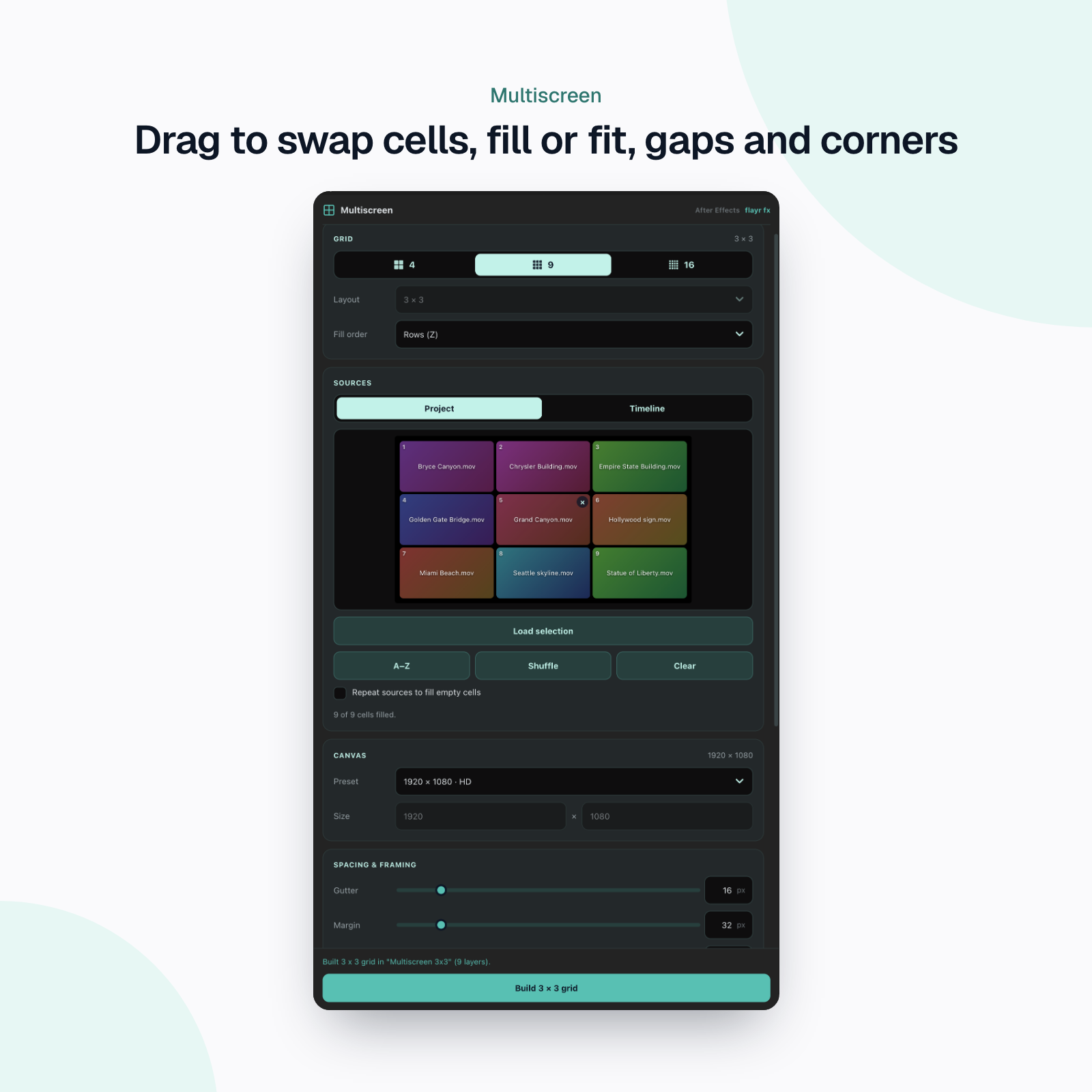
Video walls, split screens, reaction grids, social mosaics. Flayr FX Multiscreen lays your clips out in a grid for you, in Premiere Pro or After Effects: pick 4, 9 or 16 cells, load your clips and press Build grid. Every clip is scaled, positioned and cropped to its cell, with gaps and margins to the pixel.
What it does
- Grids and strips: 2×2, 3×3 and 4×4, plus 4×1, 1×4, 8×2 and 2×8 strips. Auto picks the layout whose cells best match your footage. Fill the cells by rows or by columns.
- From the project or the timeline: select clips in the Project panel and it builds a new sequence or comp, or select clips already in your sequence (or layers in your comp) and it arranges them into the grid where they are.
- A live preview: drag cells to swap them, empty one with ×, sort A–Z or shuffle, and repeat your clips to fill any empty cells.
- Fill or fit: fill each cell and crop the overflow, or fit the whole clip inside with letterboxing. Gutter and margin in pixels.
- Any canvas: HD, UHD, vertical 1080×1920, square, 4:5 or a custom size.
- Nested for you: the finished grid drops into the sequence or comp you have open, at the playhead, as one nested sequence or pre-comp on a free track, so nothing in your edit is overwritten. Clips arranged on the timeline are nested or pre-composed in place. If the sizes differ, it’s scaled to fit.
- In Premiere Pro: one video track per cell with Motion and Crop set for you, audio from cell 1 only, all or none, and an option to trim every clip to the shortest.
- In After Effects: one layer per cell, cropped with a mask that’s replaced (not stacked) when you rebuild, rounded corners, a duration from the longest or shortest clip or a fixed length, your frame rate and an optional background solid. All one undo.
- Remembers your settings for next time.
Who it’s for
Editors and motion designers who build split screens by hand: social and YouTube editors, event and music videos, sport and corporate montages, and anyone making a video wall for a screen or a pitch.
Installing
Unzip, then run the installer: Install.command on a Mac, Install.bat on Windows. It copies the panel into Adobe’s extensions folder and allows unsigned extensions, which the panel needs. Restart Premiere Pro or After Effects and choose Window › Extensions › Multiscreen Builder. Works on Mac and Windows, Premiere Pro and After Effects 2022 and later.
A closer look
Screenshots of Flayr FX Multiscreen at work, taken in the app.